
Adios for Flickr FAQ
Is it free?
The demo exports your first five albums completely, as real folders on your disk. If your account has more albums, you need a one-time license to export the rest.
The regular price is 29 €; the current price is 19 €. All applicable taxes are included. There is no subscription. One license exports unlimited albums, photos and videos and can be activated on up to five computers. Download Adios for Flickr.
Can I cancel Flickr Pro afterwards?
Yes — but export first, then cancel. Once your albums sit on your own drive and you have checked the folders, Flickr is optional: Adios needs no Pro account, and the exported files are the originals. Free accounts have limits; Flickr states that content above those limits may be suspended or deleted.
Paid once, the Adios license costs less than three months of a Pro subscription — and it does not renew.
Which computers can run Adios?
Adios requires Windows 10 or 11 on a 64-bit PC, or macOS 12 and later. The Mac version runs natively on both Intel and Apple silicon.
How does it work?
You sign in directly on Flickr inside the app. Adios then checks whether your official Flickr Data export is ready and requests it for you if necessary. When Flickr has finished preparing the export, Adios downloads and unzips it, checks the contents and rebuilds your albums as normal folders on your computer.
Can I get my original photos and videos without Flickr Pro?
Yes. Flickr limits album and bulk downloads from free accounts to photos no larger than 1024px, and videos are excluded from album downloads for every account, Pro included. Adios instead uses the complete Flickr Data export, which Flickr makes available to both free and Pro users. It contains your original photos and videos. These differences are documented in Flickr's current download help.
Does Adios for Flickr upload or share my photos?
No. Your Flickr login takes place directly on Flickr, and your export files are downloaded straight from Flickr to the folder you choose on your computer. Adios for Flickr does not upload your photos, videos, account metadata or Flickr login details to us or to another service.
The only data the app sends anywhere other than Flickr is your license key, to verify that your license is valid. All processing of your Flickr export happens locally on your computer.
How do I request my Flickr data again if something has changed?
Go to your Flickr settings page and find the "Your Flickr Data" section. Choose the option to request the data again, wait for Flickr's email, then reopen Adios and log in to continue.
How do I request Flickr data for a different Flickr account?
In the app menu, select "Reset Flickr login data". Adios restarts and lets you log in with another Flickr account.
Can I skip the Flickr data download? I have already done that.
Yes. Click "Get started" and then select "I already downloaded my account data" below the "Log in now" button. Adios will ask you to choose the extracted account data and photo data folders.
Why does this app exist? Why not just use the Flickr export options?
I built Adios after trying to bring home my own archive of 22,310 photos in 113 albums. A manual album download means requesting a separate ZIP, waiting for a separate email and then matching a generic download back to its album. Free accounts only receive photos up to 1024px this way, and album downloads leave out videos entirely — that one applies to Pro accounts too.
After six albums I stopped and built a better process. I have refined it since 2019 so other Flickr users do not have to spend hours repeating and sorting the same steps. The original investigation is documented in the 2019 article 5 ways to download all of your original Flickr photos and albums. Its original prices and screenshots are now historical, but the manual-download problem it describes remains the reason Adios exists.
What about photos that are not in any Flickr album?
Adios for Flickr finds them automatically. Before the export starts, you can choose whether to put them into a separate _PHOTOS_NOT_IN_ANY_ALBUM folder.
Why doesn't the app use the Flickr API?
The Flickr API is useful for individual actions, not for bringing an entire archive home. It does not give Adios the same complete, ready-to-download archive that Flickr's official account export provides: original files in bulk, the data needed to rebuild album membership, and a route that works for Free and Pro accounts alike.
How long does it take until my Flickr account data is ready to download?
Flickr emails you when the files are ready. Preparing the export can take anywhere from a few minutes to a few days. You can safely quit Adios while you wait, then reopen it and log in to continue.
How long does it take to download my Flickr account data?
It depends on:
- the number of albums and photos in your account
- your internet connection
- your target download folder. It is faster to pick your internal hard drive than a slow network storage or an attached USB drive.
How long does it take to create my album folders?
It depends on:
- the number of albums and photos in your account
- where the Flickr account data has been downloaded to
- the location you want to export to
If you have the space, pick folders on your internal hard drive. That should be the fastest option.
How much free disk space do I need?
During the download, the ZIP files and their extracted contents coexist temporarily, so plan for roughly twice the download size. Before creating any album folders, Adios shows the exact additional space it will need. When moving instead of copying photos, that is often none — except for photos that belong to more than one album. If you have enough space, use your internal SSD for downloading and extracting first; then move the finished album folders wherever you want to keep them.
Is there a log file?
Yes. Open "About" from the app menu to see its exact location and reveal it in Finder or Explorer. The app also writes an export-report.txt summary and, when needed, a missing_photos.txt file into your export folder. The accompanyingadios-debug.txt contains IDs, counters and error codes but no photo names or absolute paths, so it is safe to attach to a support email.
The download or album export was interrupted. What can I do?
Reopen Adios and start the process again. Completely downloaded files are reused, existing album folders are kept and files that were already exported with the same size are skipped. You do not have to start over.
Can I sync my local copy with Flickr?
Not as a true sync, but you can refresh it whenever you like. Flickr only ever produces a complete export — there is no “what changed since last time” to ask for — so refreshing means requesting a new export and downloading it in full. Rebuilding the albums is incremental, though: point Adios at the same target folder and it reuses your existing album folders and skips every photo that is already there, so only new photos are copied. Your license covers unlimited exports.
Adios never deletes anything. Photos and albums you removed on Flickr stay in your local copy, and a renamed album appears as a new folder next to the old one — the archive grows, it does not mirror your account.
Do the photos keep all their metadata?
On the review screen, you choose whether Adios writes Flickr titles, descriptions, tags, dates, places and orientation into the exported JPEG copies. You can also choose to use the title you gave a photo on Flickr as its file name. It can also create optional XMP sidecars — useful for Lightroom and other photo apps that read XMP sidecars. The downloaded original files remain unchanged.
Adios also sets each exported file's modification date to Flickr's date-taken value. This means that when you sort by "Date Modified" in Finder or File Explorer, your photos appear in capture order instead of export order.
Where should I keep the photos after the export?
Ideally not on a single drive. Once your albums are on your computer, they are exactly as safe as that one disk — and every disk fails eventually.
The cheapest second copy is usually the storage you already pay for: iCloud Photos, Google Photos or Google Drive, Amazon Photos (included with Prime), Dropbox or OneDrive all take the album folders without any additional cost.
If you would rather stay local, use two drives and keep one of them somewhere else — an external disk sitting next to your computer shares its fate in case of theft, fire or water damage. Adios never uploads anything itself; where the copies go is entirely your decision.
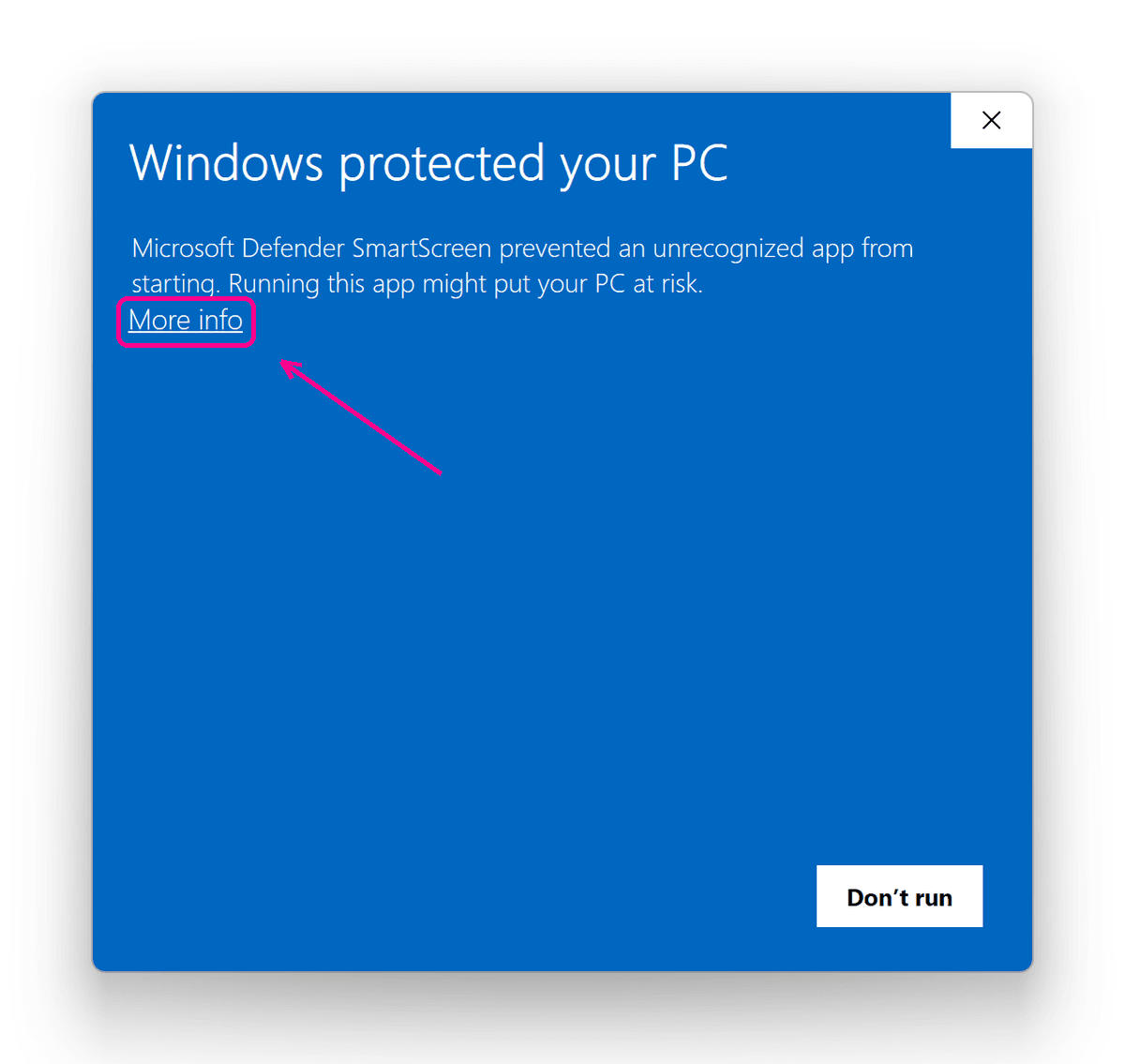
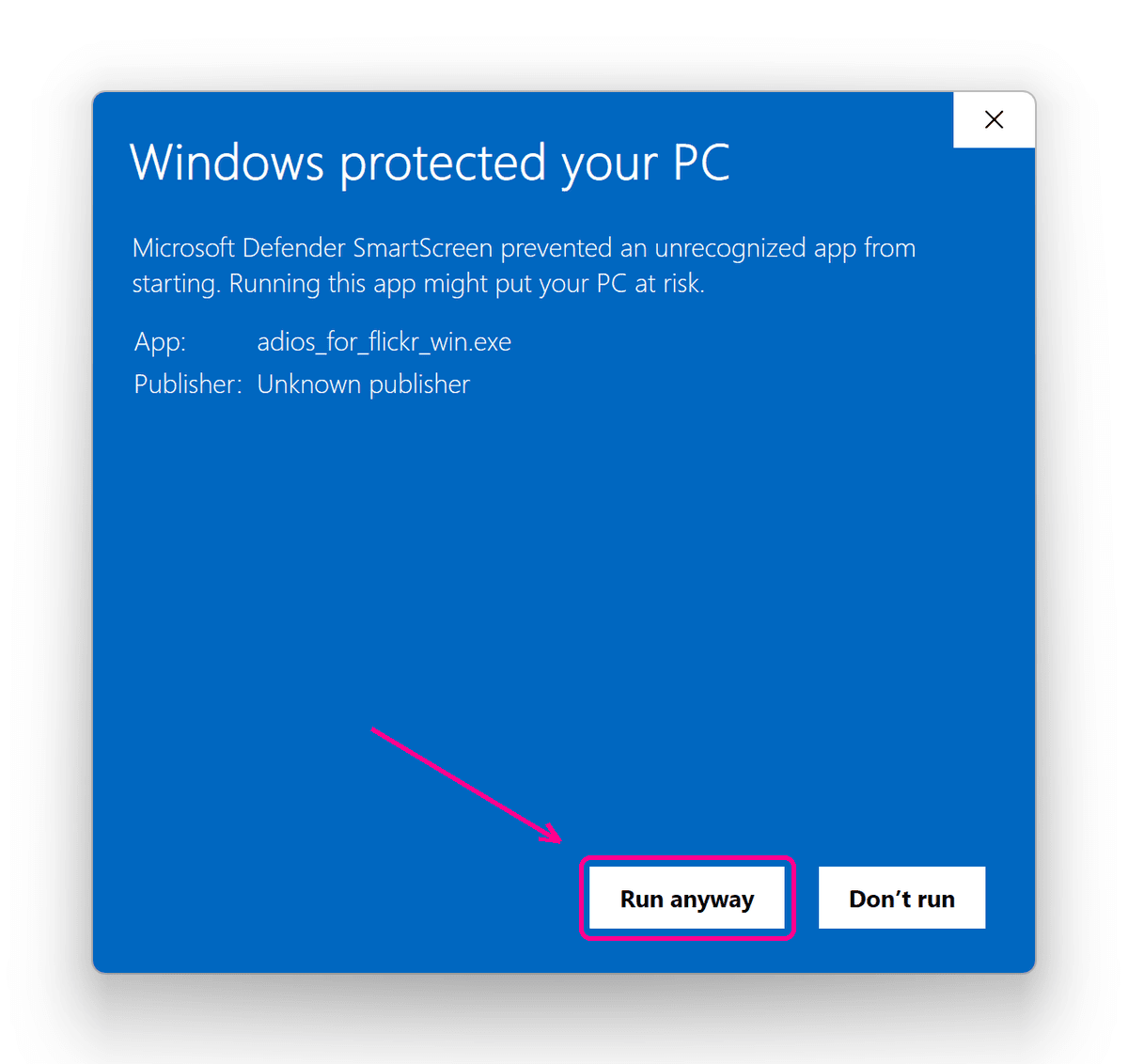
"Windows protected your PC" appears on app start. Now what?
Click "More info" and then "Run anyway".
Adios is intentionally distributed without a Windows code-signing certificate. Windows may therefore show a Microsoft Defender SmartScreen warning the first time you open it. The dialog offers no way forward at first — the button appears only after "More info":
Why is the Windows version not code-signed?
Mostly because a code-signing certificate would not do what people expect it to. SmartScreen does not go by the certificate alone — it goes by how widely a file is already in use. Even an expensive EV certificate no longer grants instant trust, so a fresh release of a small app would still be met with the warning for a while.
Signing has become genuinely affordable in the meantime — Microsoft's own service costs around ten dollars a month — and it is on the list. It just is not the switch that turns the warning off overnight. What does not depend on it: the Mac version is signed and notarized by Apple, and the Windows download is the same file for everyone, so you can compare its checksum with the one published with each release.
Still have a question?
Drop me an email. I will get back to you as soon as possible.